English
  日本語
日本語 
Online Japanese Classroom Software Setup
Classroom Software Setup
Please use Zoom's Test Room to check your audio, video and speakers.

For the Japonin(JOI) classes, you will need to use your Japonin(JOI) Username in the classes, and this needs to be set by you manually.
“How do I change my Name in Zoom”
①Please Right Click on your name within Zoom.
② You will see a pop-up window as below.
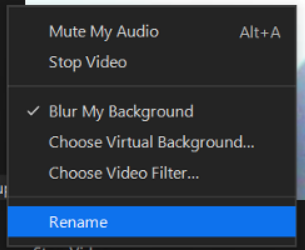
③ Select [Rename] and click, and you will see a box to enter your Display Name.
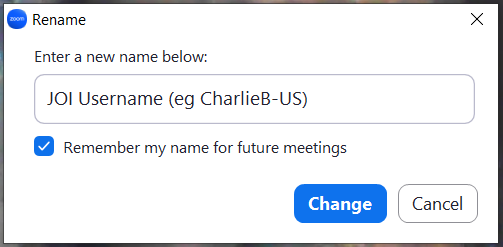
④ Please enter your Japonin(JOI) Username in the space, and put a check to "Remember my name for future meetings".
Please also check out our Zoom Guidelines for any troubleshooting.